Best Melodyne Alternatives in 2026: What Actually Replaces It?
The best Melodyne alternatives for manual vocal tuning, pitch editing, real-time correction, and budget workflows — including Vovious, RePitch 2, AutoTune Pro, Waves Tune, and stock DAW tools.
Search for a Melodyne alternative and you will find plenty of lists recommending MetaTune, Waves Tune Real-Time, GSnap, Graillon, AutoTune, and whatever else happened to be on sale when the article was written.
There is only one problem: half of those plugins do not replace Melodyne.
They correct pitch, yes. But Melodyne is not simply an automatic tuner. It is a note-level audio editor. You can open a recorded performance, separate notes, repair pitch drift, reshape vibrato, move timing, adjust formants, and decide exactly which imperfections should stay. A real-time tuner that pulls every note toward a scale may be useful, but it is solving a different problem.
I spent time going through product documentation, engineer discussions, Reddit threads, and user reports because I wanted to separate genuine Melodyne competitors from plugins that merely share the words “pitch correction” on the box.
The answer is not a dramatic “Melodyne is dead” headline. Melodyne is still exceptionally capable, especially for polyphonic material and established professional workflows. But it is no longer the only serious option — and depending on the job, it may not be the fastest or most comfortable one.
Contents
- 01.Quick answer
- 02.What are you actually trying to replace?
- 03.What I looked for
- 04.Vovious — best modern vocal-editing workflow
- 05.RePitch 2 — best for a complete vocal-production workflow
- 06.AutoTune Pro 11 — best automatic/manual hybrid
- 07.Waves Tune — best budget graphical editor
- 08.Use the editor already inside your DAW
- 09.Are there any free Melodyne alternatives?
- 10.What about MetaTune and Waves Tune Real-Time?
- 11.Common problems users report
- 12.Field notes: what engineers actually use
- 13.My recommended workflow
- 14.Which Melodyne alternative should you choose?
- 15.Final verdict
- 16.Frequently asked questions
Quick answer
If you need a short version before we get into the weeds:
- •Vovious is the most interesting modern alternative for monophonic vocal editing and a faster, clearer workflow.
- •RePitch 2 is the strongest alternative when pitch, timing, doubles, and backing vocals all belong to the same production process.
- •AutoTune Pro 11 is the best hybrid if you want automatic tuning and a graphical editor in one ecosystem.
- •Waves Tune is the budget manual editor — not to be confused with Waves Tune Real-Time.
- •Logic Flex Pitch, Cubase VariAudio, and FL Studio NewTone may be all you need if your DAW already includes them.
- •MetaTune, Waves Tune Real-Time, GSnap, MAutoPitch, and Graillon are useful automatic tuners, but they are not full Melodyne replacements.
| Option | Workflow | Best for | Main limitation |
|---|---|---|---|
| Vovious | Manual note editing, ARA2 | Fast, natural vocal tuning | Monophonic only; newer product |
| RePitch 2 | Manual pitch and timing editing | Lead vocals, doubles, stacked harmonies | Workflow takes learning; some ecosystem concerns |
| AutoTune Pro 11 | Real-time plus Graph Mode | One ecosystem for tracking and editing | Expensive; deeper than many users need |
| Waves Tune | Classic graphical editor | Budget manual correction | Dated workflow and Waves ecosystem |
| DAW tools | Built into the project timeline | Owners of Logic, Cubase, or FL Studio | Quality and depth vary by DAW |
Prices and sales change constantly. Compare the edition and feature set you actually need, not the largest number on a product page.
What are you actually trying to replace?
Before choosing a plugin, decide which part of Melodyne you use.
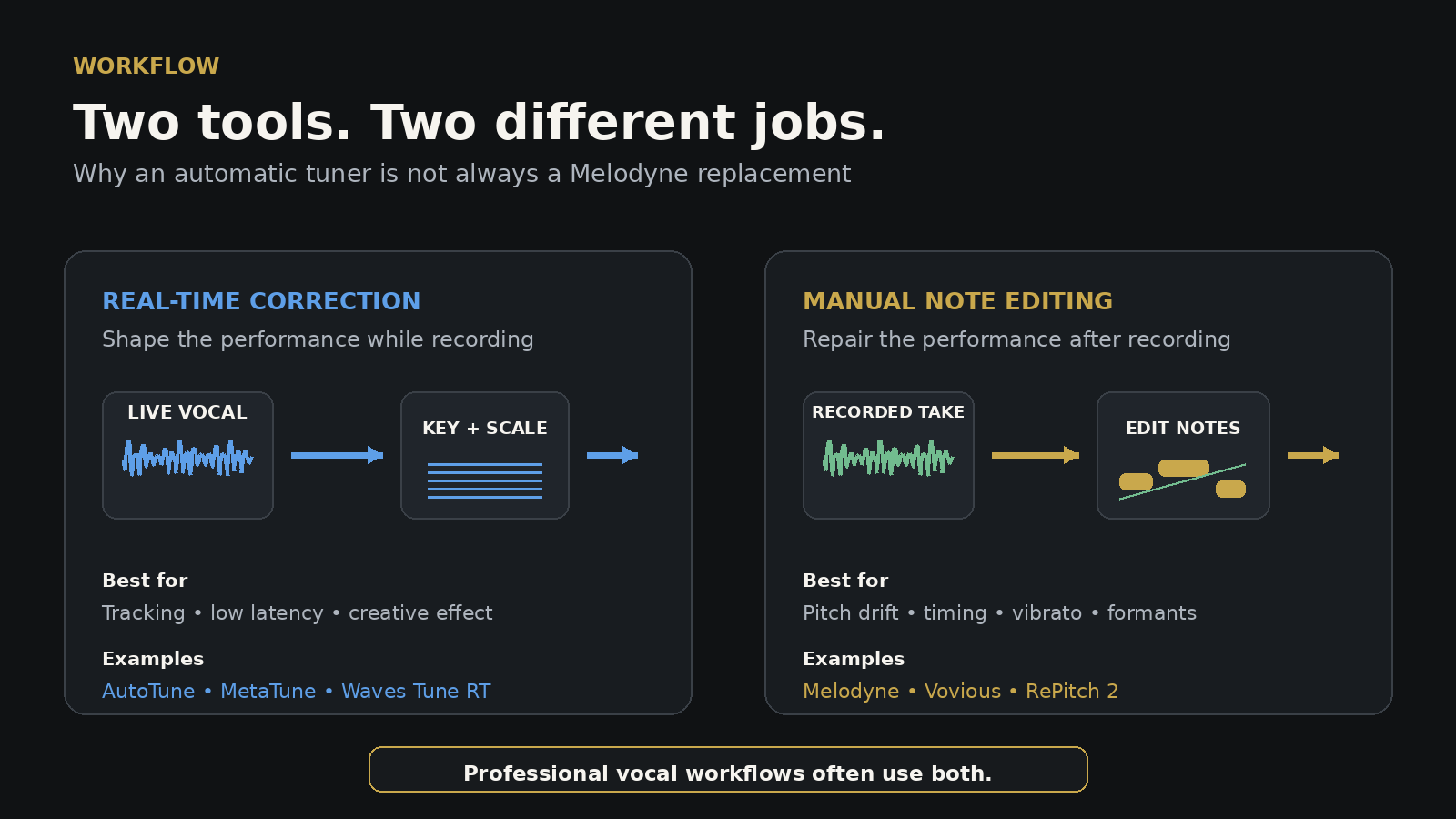
Automatic correction while recording
You insert a tuner, choose the key and scale, set the correction speed, and record through it. The singer hears the processed sound immediately. In some genres, the correction changes how the vocalist performs.
This is the territory of:
- •AutoTune 2026;
- •MetaTune;
- •Waves Tune Real-Time;
- •GSnap;
- •MAutoPitch;
- •Graillon.
Manual editing after recording
You analyze the performance, see individual notes, and decide what to change. One word may need pitch-center correction, another may need less drift, and a third may be technically flat but emotionally perfect.
This is the territory of:
- •Melodyne;
- •Vovious;
- •RePitch;
- •AutoTune Pro Graph Mode;
- •Waves Tune;
- •Flex Pitch, VariAudio, and NewTone.
The distinction matters because an automatic tuner can make the entire vocal “more correct” while still placing one phrase on the wrong note. A manual editor lets you repair that phrase without ironing the personality out of everything around it.
Many engineers use both categories. Track through an automatic tuner, then open the final vocal in a note editor. It sounds excessive until the automatic plugin confidently corrects one expressive slide to the wrong scale degree. Then the second stage suddenly feels less like luxury and more like insurance.
What I looked for
A useful Melodyne alternative needs more than a pitch knob. I compared the options by the things that matter in real sessions:
- •how quickly the plugin detects and separates notes;
- •whether pitch drift and vibrato can be edited independently;
- •how it handles sibilants and unvoiced material;
- •timing and formant control;
- •integration with the DAW;
- •stability on long sessions;
- •how edits sound when pushed beyond gentle correction;
- •whether the workflow is fast enough for stacked vocals;
- •what happens when the algorithm guesses wrong.
Small pitch changes rarely expose major differences. Most competent tools can move a clean note by ten cents without setting the room on fire. The real test is messy material: slides, breathy attacks, fast phrases, note transitions, vibrato, doubles, and vocals recorded by a human being rather than a calibration tone.
Vovious — best modern vocal-editing workflow
Vovious arrived in late 2025 and became the first new vocal editor in years to make experienced Melodyne users seriously reconsider their routine.
I have already covered it in detail in my Vovious vs Melodyne review, so I will keep the overview focused.
Why it stands out
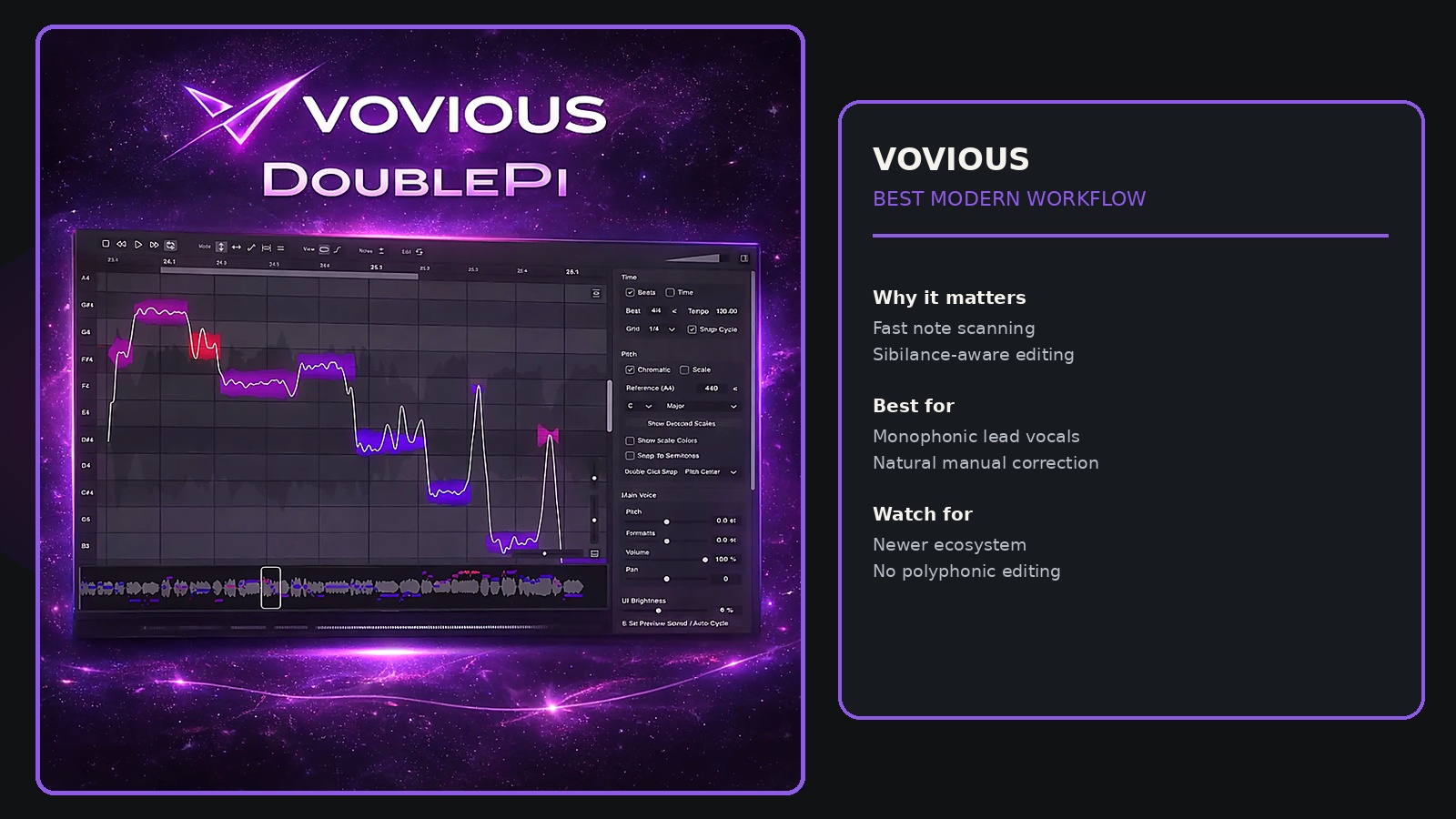
Vovious makes problem notes easy to find. Its color system shows pitch confidence and deviation clearly, instead of presenting the entire performance as a neutral field of blobs and asking you to investigate each one like a detective with a deadline.
It also includes several workflow details that sound minor until you tune vocals every week:
- •note preview;
- •automatic marking of sibilant regions;
- •separate amplitude control for unvoiced sounds;
- •temporary-note editing for small sections;
- •ARA2 integration;
- •one complete edition rather than a ladder of upgrades.
The main appeal is speed. The interface encourages you to fix what needs fixing and leave the rest alone. That is exactly how natural vocal tuning should work.
What users like
Forum discussions repeatedly mention the modern interface, smooth processing, and more enjoyable workflow. Some users describe difficult glides and strong pitch moves as sounding cleaner than equivalent edits in Melodyne. Others prefer Vovious even in DAWs without full ARA convenience because the editing logic feels more direct.
That enthusiasm is worth noting, but so are the caveats.
What can go wrong
Vovious is still young. User reports include requests for better original-versus-corrected comparison, more granular reset and undo behavior, and occasional stability concerns in early versions. The development team has already issued multiple compatibility and bug-fix updates, which is encouraging, but it does not magically give the plugin Melodyne’s two-decade track record.
It is also monophonic. Melodyne’s higher editions can edit notes inside polyphonic piano or guitar material. Vovious is designed for vocals and other single-note sources.
Price comparison needs context
It is tempting to write “Vovious costs $229, Melodyne Studio costs $699” and declare a knockout. That comparison is catchy and incomplete.
For straightforward monophonic vocal work, Melodyne Assistant is the more relevant comparison than Melodyne Studio. Studio earns its higher price through multitrack and polyphonic capabilities that Vovious does not try to replace.
Verdict: choose Vovious if your work is mainly vocals and you value speed, clarity, and a modern interface more than polyphonic editing or decades of ecosystem history.
RePitch 2 — best for a complete vocal-production workflow
RePitch 2 is the omission that makes many “best Melodyne alternatives” lists hard to take seriously.
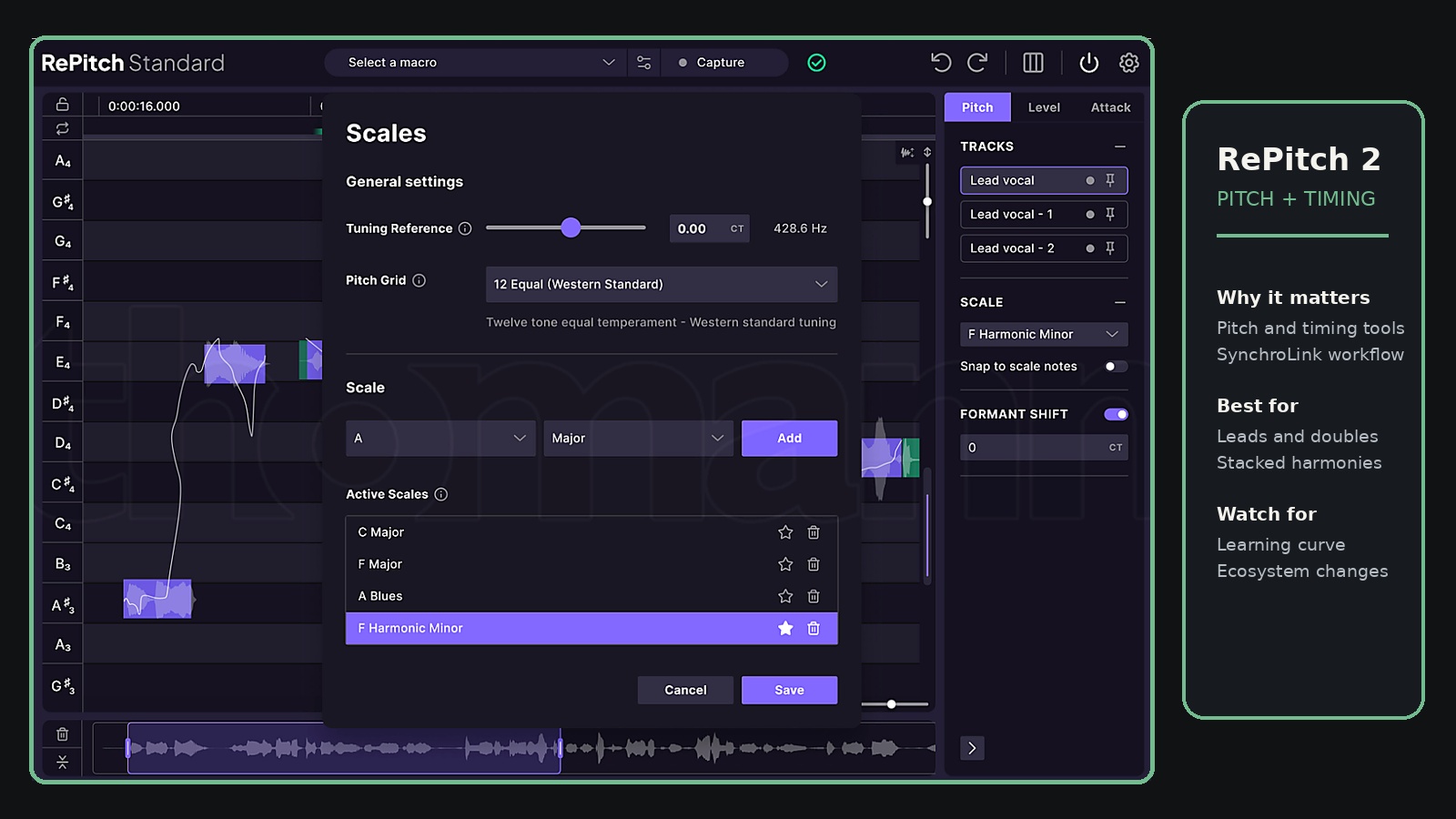
It is a genuine note editor. You can adjust pitch, timing, note length, formants, transitions, and detailed pitch curves. Macros get you close quickly, then manual tools let you deal with the phrases that refuse to behave.
The real advantage: RePitch does not live alone
RePitch becomes especially interesting when paired with VocAlign. Through SynchroLink, edited lead-vocal information can feed the alignment workflow for doubles and backing vocals.
That solves a common production problem. Tuning one lead is manageable. Tuning the lead, two doubles, eight harmonies, and a stack of ad-libs makes you reconsider every decision that brought you into music.
A connected pitch-and-alignment workflow can save far more time than a slightly prettier note display.
What users like
Engineers often praise RePitch for natural results, flexible note splitting, and the ability to draw or reshape pitch behavior more directly than in Melodyne. Timing controls sit close to pitch controls, which reflects how vocal editing actually works: a note that feels wrong may be late rather than flat.
RePitch 2 also offers a sensible edition structure. Standard is the full manual editor; Elements covers simpler jobs at a lower price.
What users complain about
Not everyone finds the interface immediately comfortable. Some longtime Melodyne users describe it as clunky until the workflow clicks. There are also community concerns around subscription direction and how existing Synchro Arts customers were handled after the LANDR acquisition.
Those are not sound-quality problems, but purchasing a plugin means buying into its update and licensing ecosystem too. The audio may be timeless. Account managers rarely are.
Verdict: choose RePitch 2 if you work with lead vocals, doubles, and harmony stacks and want pitch and timing correction to behave like one connected job.
AutoTune Pro 11 — best automatic/manual hybrid
AutoTune Pro 11 belongs in this comparison because Graph Mode changes the category.
AutoTune 2026 is primarily a streamlined real-time tuner. AutoTune Pro 11 combines automatic correction with detailed graphical pitch and time editing, plus ARA2 support in compatible DAWs.
That makes it attractive for producers who want one ecosystem from recording to final correction.
Where it wins
- •classic AutoTune sound while tracking;
- •low-latency automatic correction;
- •Graph Mode for manual work;
- •formant and vibrato controls;
- •harmony features;
- •familiar results across modern pop, rap, and R&B.
If the vocalist performs into AutoTune and that response is part of the style, staying inside Antares for later editing can make sense. The correction behavior remains consistent from tracking through mix preparation.
Where it falls short
Graph Mode is powerful, but Melodyne remains the more established dedicated editing environment. If you never need the real-time AutoTune sound, you may be paying for half a product you do not use.
The price is also substantially higher than RePitch Standard or many sale-priced alternatives.
Verdict: choose AutoTune Pro 11 if automatic tuning and manual editing are equally important and you want both under one roof.
Waves Tune — best budget graphical editor
This section requires one important warning:
Waves Tune and Waves Tune Real-Time are different plugins.
Waves Tune Real-Time is an automatic tracking tuner. Waves Tune is the graphical editor that belongs in a Melodyne comparison.
The original Waves Tune lets you analyze recorded audio, view detected notes, and manually correct pitch and transitions. It is often heavily discounted, which makes it one of the cheapest ways to get a proper visual tuning workflow.
Why it is still relevant
- •manual note editing;
- •familiar piano-roll presentation;
- •transparent results on moderate corrections;
- •much lower sale price than premium editors;
- •a better conceptual replacement for Melodyne than Waves Tune Real-Time.
Why it is not an automatic recommendation
The workflow feels old. Tempo changes and transfer behavior have caused frustration for some users, and the Waves licensing/update ecosystem remains divisive. Several DAWs now include built-in tools that cover the same basic territory without another installer, license manager, or annual conversation about upgrade plans.
Still, when Waves Tune is on sale and your DAW lacks a capable editor, it can solve the job for very little money.
Verdict: choose Waves Tune when budget matters more than modern workflow and you need manual note editing rather than live correction.
Use the editor already inside your DAW
The cheapest Melodyne alternative may already be installed.
Logic Pro Flex Pitch
Flex Pitch lives directly in Logic’s audio editor. It handles pitch center, drift, vibrato, timing, formants, and gain without transferring audio into a separate environment.
Users generally see Melodyne as more refined for difficult corrections, but Flex Pitch is fast, integrated, and completely adequate for many pop and demo vocals.
Cubase VariAudio
VariAudio is deeply integrated into Cubase and works naturally with the project’s scale and chord tools. For Cubase users, the workflow advantage is substantial: no transfer, no extra plugin window, and no separate license.
FL Studio NewTone
NewTone is Image-Line’s detailed pitch and time editor. Do not confuse it with Pitcher, which is the real-time automatic tuner. NewTone is the FL Studio tool that actually belongs in a Melodyne-alternative discussion.
The limitation of stock tools
You are tied to the DAW. Move the session to another platform and the edits may not travel cleanly. Detection quality and artifact handling also vary, particularly on difficult breathy or highly expressive vocals.
Verdict: start with the DAW editor you already own. Upgrade when it becomes the bottleneck, not because a comparison table made your current tool feel insecure.
Are there any free Melodyne alternatives?
There are excellent free automatic tuners. There is no free plugin that fully replaces Melodyne’s manual editing workflow across DAWs.
GSnap
GSnap is a free monophonic automatic tuner with scale and MIDI-controlled modes. It can gently nudge notes or produce a strong Cher/T-Pain-style effect.
The limitations are important:
- •no full blob-style note editor;
- •complex phrases can require extensive MIDI programming;
- •rapid note changes may confuse detection;
- •best suited to simple monophonic material.
Use it for automatic correction and effects, not detailed vocal surgery.
MAutoPitch and Graillon
Both are useful for free real-time correction and creative vocal processing. They are better comparisons to AutoTune or MetaTune than to Melodyne.
ReaTune
Reaper users already have ReaTune. It offers automatic and manual correction, although the workflow is less polished than dedicated editors. It may be enough for occasional repairs.
Bottom line: free tools can improve pitch. They usually do not offer the same speed, note detection, editing depth, and integration as a mature paid editor.
What about MetaTune and Waves Tune Real-Time?
Both are good plugins. Neither is a direct Melodyne replacement.
MetaTune
MetaTune is one of the best creative automatic tuners for modern rap, trap, and hyperpop. Negative Speed, Note Stabilizer, grouped control, and its built-in doubler make it fast and inspiring during tracking.
Users often describe it as easier to perform through than more surgical tools. That is valuable — but it does not let you manually reshape a single note after recording in the way Melodyne, Vovious, or RePitch does.
Waves Tune Real-Time
Waves Tune Real-Time is aimed at studio tracking and live use. It tends to be less aggressively robotic than some competitors and works well for R&B, pop, rock, and singers who want support without turning pitch correction into the main character.
Again: useful, affordable, and not a note editor.
For a deeper comparison of automatic tuners, see the Auto-Tune alternatives guide. Keeping these categories separate avoids recommending a screwdriver to someone shopping for a scalpel.
Common problems users report
Across forums and product discussions, the same issues appear repeatedly.
The algorithm chooses the wrong note
Automatic correction only knows the key, scale, and incoming pitch. It does not know the musical intention. Slides, passing notes, blues notes, and unstable attacks can be pulled toward the wrong target.
Practical fix: use automatic correction lightly, then repair individual errors manually.
Sibilants get dragged with the note
Pitching an “s” or “sh” sound creates artificial chirps and lisps.
Practical fix: use a tool that separates or detects unvoiced regions, or split and bypass the sibilant manually.
Every note becomes technically correct and emotionally dead
A vocal is not a MIDI file with lungs. Scoops, drift, vibrato, and imperfect transitions often carry the performance.
Practical fix: correct pitch center first. Leave modulation and transitions alone unless they are genuinely distracting.
Heavy correction creates formant artifacts
Large pitch moves can make a voice sound smaller, larger, younger, or strangely synthetic.
Practical fix: adjust formants carefully and consider re-recording the phrase. No plugin deserves several hours of surgery to rescue a take the singer can replace in five minutes.
ARA convenience becomes an ARA compatibility problem
ARA integration is excellent when the DAW and plugin agree. When they do not, edits may fail to save, render, or recall correctly.
Practical fix: keep the DAW and plugin updated, verify compatibility, and render tuned vocals before archiving or moving the session.
Sales distort the comparison
One plugin may look “five times cheaper” because it is on a permanent 80% sale. Another may include a lite edition with the DAW. A third may require a subscription for updates.
Practical fix: compare the total workflow cost, not only today’s banner price.
Field notes: what engineers actually use
Reading the specs is one thing. Reading years of tuning threads — r/audioengineering, r/mixingmastering, Logic and KVR forums — is another. A few patterns come up so consistently that they are worth passing on exactly as I found them.
Pros don’t pick one — they rotate
In a recent thread on tuning habits, working engineers describe using AutoTune Pro, Melodyne, and Waves Tune interchangeably, “as they have strengths and weaknesses” — Graph Mode for speed, Melodyne for the hard passages, Flex Pitch for a one-note fix. Nobody argued with them. That quiet consensus matches the whole point of this article: choose per job, not per brand.
The recall horror story that keeps repeating
A ten-year graphical AutoTune user reported projects reopening with the graph tuning “entirely off — not just wrong key, everything sounds horrible” on Apple Silicon — then paid for the newest version and hit the same problem. Whatever editor you buy: render the tuned vocal to audio the moment you are happy with it. Plugin recall is not an archive format.
The gripe you only discover after three hours of tuning
One engineer described tuning a take note-for-note, then changing a de-esser setting on the source — and losing the entire tuning pass. That is a property of transfer-based editors in general, not a defect of one brand. Commit your tuning before you keep processing the chain. Stage 3 in the workflow below exists for exactly this reason.
Stacks change the answer
Ask a forum about one lead vocal and you get note editors. Ask about stacks and the Revoice Pro fans appear instantly — “it’s magic how well it allows you to tune and line up vocal stacks.” If your real pain is doubles and harmonies, weigh the Synchro Arts pairing (RePitch + VocAlign) more heavily than any single-editor comparison.
My recommended workflow
For polished modern vocals, I would not ask one plugin to do everything.
Stage 1: tracking
Use AutoTune, MetaTune, or Waves Tune Real-Time at low latency. Let the singer hear the intended vocal character, especially if hard tuning is part of the genre.
Stage 2: manual editing
Use Vovious, RePitch, Melodyne, AutoTune Graph Mode, or the DAW’s editor to fix individual notes, transitions, timing, and detection mistakes.
Stage 3: commit the tuning
Render or bounce the corrected vocal before heavy mixing. This protects the session from later plugin updates, ARA recall problems, and licensing surprises.
Stage 4: mix the performance
Only then move into cleanup, de-essing, compression, EQ, saturation, automation, reverb, and delay — the part of the job professional mixing and mastering is actually about. My vocal reverb and delay chain covers the spatial side of that process.
This two-stage approach sounds slower. In practice it is faster because you stop asking an automatic tuner to solve problems it cannot understand.
Which Melodyne alternative should you choose?
Choose Vovious if…
You mainly edit vocals, want a modern interface, and do not need polyphonic correction.
Choose RePitch 2 if…
You tune leads, doubles, and backing vocals and want pitch, timing, and alignment to work as one system.
Choose AutoTune Pro 11 if…
You need the classic automatic effect while tracking and want graphical editing in the same ecosystem.
Choose Waves Tune if…
You need a cheap manual editor and can live with an older workflow.
Use your DAW’s editor if…
You tune vocals occasionally and the built-in tool already gets the result without obvious artifacts.
Stay with Melodyne if…
You need polyphonic editing, multitrack depth, proven compatibility, or a workflow your studio already trusts.
That last answer is not very exciting, but neither is replacing a mature tool just because the internet discovered a new interface last Tuesday.
Final verdict
The best overall Melodyne alternative for vocal-only work is Vovious. It offers the clearest modern workflow and is designed around the exact frustration many engineers have with Melodyne: tuning takes too long and too much clicking.
The best production-system alternative is RePitch 2, especially when doubles and harmonies need timing alignment as well as pitch correction.
The best hybrid is AutoTune Pro 11, because it can follow the vocal from tracking through Graph Mode editing.
The best budget manual editor is Waves Tune, while the best free option is usually the editor already included in your DAW.
But the most honest conclusion is this: there is no universal replacement for Melodyne because users are trying to replace different parts of it. Choose the workflow first. The plugin becomes much easier to choose once you stop asking every pitch tool to do the same job.
Frequently asked questions
Is Vovious better than Melodyne?
For monophonic vocal editing, Vovious may feel faster and more modern. Melodyne remains stronger for polyphonic material, mature multitrack workflows, and long-term ecosystem confidence.
Is RePitch a real Melodyne alternative?
Yes. RePitch offers manual note-level pitch and timing editing and is one of the closest direct competitors. Its connection with VocAlign makes it particularly useful for layered vocals.
Can MetaTune replace Melodyne?
Not for detailed manual editing. MetaTune can replace an automatic tracking tuner such as AutoTune in many workflows, but it does not provide the same note-by-note editing environment as Melodyne.
Is Waves Tune Real-Time the same as Waves Tune?
No. Waves Tune Real-Time is an automatic live and tracking tuner. Waves Tune is the graphical editor that is closer to Melodyne.
What is the best free alternative to Melodyne?
Start with your DAW's built-in editor. GSnap, MAutoPitch, and Graillon are useful free automatic tuners, but none fully reproduces Melodyne's manual workflow.
Do professionals use Melodyne and AutoTune together?
Yes. AutoTune or MetaTune may be used during tracking for immediate correction and vocal character. Melodyne, Vovious, or RePitch can then repair individual notes and timing after recording.
Is Melodyne still worth it in 2026?
Yes, particularly for polyphonic work, multitrack editing, and studios that need a mature standard. The alternatives are compelling because they may be faster, cheaper, or more focused — not because Melodyne suddenly stopped working.
Sources and further reading
Need help finishing your vocals?
Pitch correction is only the first step. If the vocal still feels disconnected from the track, send the session for an honest assessment and a free preview.
Get a Free Preview →Want your track to sound like this?
Send it in and get a free preview — hear the difference on your own song before you pay anything.
Get a free preview →